
Allow PortainerCE to connect Remote-Docker
Quelle:
https://www.youtube.com/watch?v=kKDoPohpiNk
https://www.the-digital-life.com/portainer-multiple-hosts/
In Remote-ROOT-Dir
mkdir docker-certs
cd docker-certs

openssl genrsa -aes256 -out ca-key.pem 4096

## Generating RSA private key, 4096 bit long modulus (2 primes)
## Enter pass phrase for ca-key.pem: ***
## Verifying - Enter pass phrase for ca-key.pem: ***

openssl req -new -x509 -key ca-key.pem -sha256 -out ca.pem

## Enter pass phrase for ca-key.pem:
## You are about to be asked to enter information that will be incorporated
## into your certificate request.
## What you are about to enter is what is called a Distinguished Name or a DN.

## Country Name (2 letter code) [XX]:**
## State or Province Name (full name) []:***
## Locality Name (eg, city) [Default City]:***
## Organization Name (eg, company) [Default Company Ltd]: ***
## Organizational Unit Name (eg, section) []: ***
## Common Name (eg, your name or your servers hostname) []:Docker
## Email Address []: info@example.com

openssl genrsa -out server-key.pem 4096

## Generating RSA private key, 4096 bit long modulus (2 primes)
## .....................++++
## .................................................................................................................++++

openssl req -subj "/CN=db" -sha256 -new -key server-key.pem -out server.csr

echo subjectAltName = DNS:[RemoteHost],IP:[AllowedIPs],IP:[AllowedIPs] >> extfile.cnf
echo extendedKeyUsage = serverAuth >> extfile.cnf

openssl x509 -req -sha256 -in server.csr -CA ca.pem -CAkey ca-key.pem -CAcreateserial -out server-cert.pem -extfile extfile.cnf
## Signature ok
## subject=CN = ***
## Getting CA Private Key
## Enter pass phrase for ca-key.pem: ***

openssl genrsa -out key.pem 4096
openssl req -subj '/CN=[PORTAINER-DNS]' -new -key key.pem -out client.csr
echo extendedKeyUsage = clientAuth > extfile-client.cnf
openssl x509 -req -sha256 -in client.csr -CA ca.pem -CAkey ca-key.pem -CAcreateserial -out cert.pem -extfile extfile-client.cnf
## Signature ok
## subject=CN = proxy
## Getting CA Private Key
## Enter pass phrase for ca-key.pem: ***

rm -v client.csr server.csr extfile.cnf extfile-client.cnf
chmod -v 0400 ca-key.pem key.pem server-key.pem
Enable Docker API on your Remote Server
Create /etc/docker/daemon.json with the following settings and replace $INTERNALIP with your IP address of the remote server.
{
    "hosts": ["unix:///var/run/docker.sock", "tcp://[Remote-DNS_Or_IP]:2376"],
    "tls": true,
    "tlscacert": "/root/docker-certs/ca.pem",
    "tlscert": "/root/docker-certs/server-cert.pem",
    "tlskey": "/root/docker-certs/server-key.pem",
    "tlsverify": true
}
Also create a file in /etc/systemd/system/docker.service.d/docker.conf.
[Service]
ExecStart=
ExecStart=/usr/bin/dockerd
systemctl daemon-reload
## INFO -- On Error: unable to configure the Docker daemon with file /etc/docker/daemon.json: the following directives are specified both as a flag and in the configuration file: hosts: (from flag: [fd://], from file:
## >> Edit /lib/systemd/system/docker.service
## and remove "-H fd://]"
## >> systemctl daemon-reload
service docker restartNow Open FirewallD-Ports
sudo firewall-cmd --permanent --add-port=2376/tcp
sudo firewall-cmd --reload
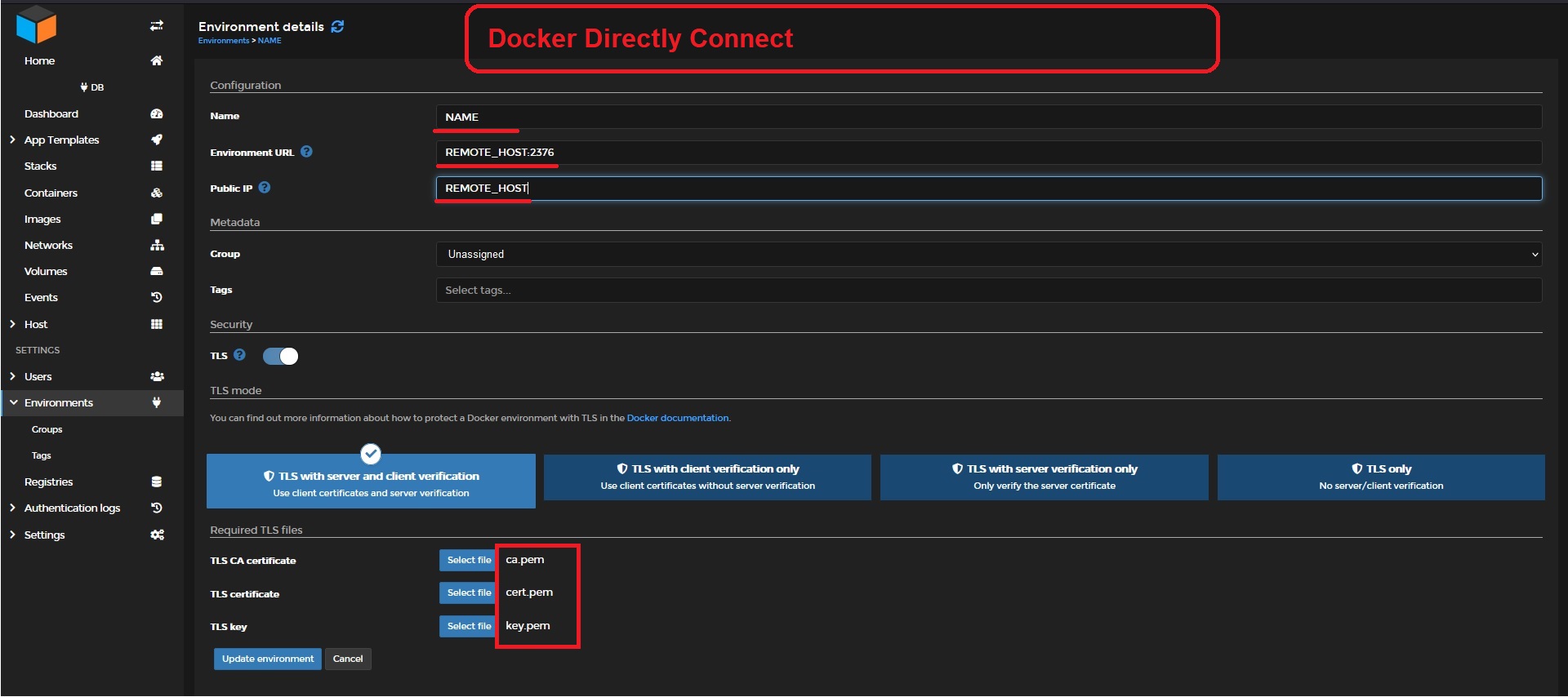
Connecting Portainer...
No comments to display
No comments to display